-Jul-04-2023-10-20-41-2403-AM.png?width=200&height=50&name=Help%20Centre%20Logo%20(800%20%C3%97%20200px)-Jul-04-2023-10-20-41-2403-AM.png)
You can now sign in to the CYGNVS mobile app by simply scanning the QR code from the CYGNVS web platform. To access the QR code, ensure you're signed in to the web platform first.
Once signed in,
-
Click the highlighted Get the app option on the right-hand side of the screen.
.png?width=688&height=228&name=image%20(9).png)
-
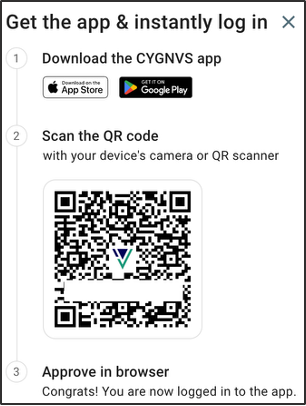
Download the CYGNVS mobile app for your Android or iOS device.
-
Use your phone's camera or a QR scanner to scan the QR code displayed on the screen.
-
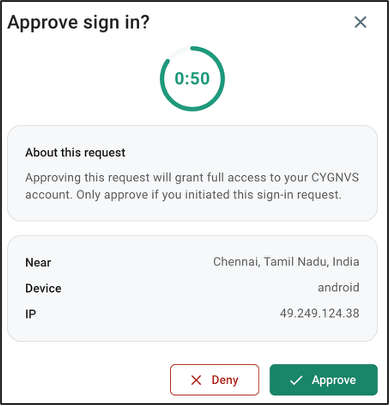
On the CYGNVS web platform, Approve the sign-in request to complete your mobile login.
-
In the mobile app, tap Continue to proceed.
-
Create and confirm your PIN for a seamless sign-in experience in the app.
-
(Optional) Enable Biometrics for faster, secure sign-ins.
You will be successfully signed in and redirected to the CYGNVS Home Screen.